

FIXING BCM NTFS FILE SYSTEM VERSION NUMBER
1. Download a copy of DSKPROBE.EXE and transfer it to the BCM through your favourite process - shared drive, FTP, etc.
2. Use WinVNC to log on to the BCM, navigate to the folder containing DSKPROBE.EXE
2. Run DSKPROBE
3. Select DRIVES->LOGICAL VOLUME
4. Double-click on the volume you're examining. This will open handle zero to that drive.
5. Click on SET ACTIVE in the HANDLE 0 area. LEAVE THE READ-ONLY BOX CHECKED.
6. Click "OK".
7. Select SECTORS->READ and read in sector 0 for length 1.
8. Select VIEW->NTFS BOOT SECTOR
9. Click the "GO" button next to "Clusters to MFT"
10. Select VIEW->BYTES.
11. Select SECTORS->READ
12. Leave the "STARTING SECTOR" value alone.
13. Set "Number of Sectors" to 8, and click on READ.
14. You have just read in the first 4 MFT records. We're looking for MFT record number 3, so we must click on the right arrow in the tool bar six times.
15. You will end up looking at the first half of MFT record 3, the MFT record for $Volume. You will see the text "$Volume" in the display.
16. There are 16 columns of hex digits. Looking down the columns, you will find a hex "70 00" followed by "0C 00" below it.
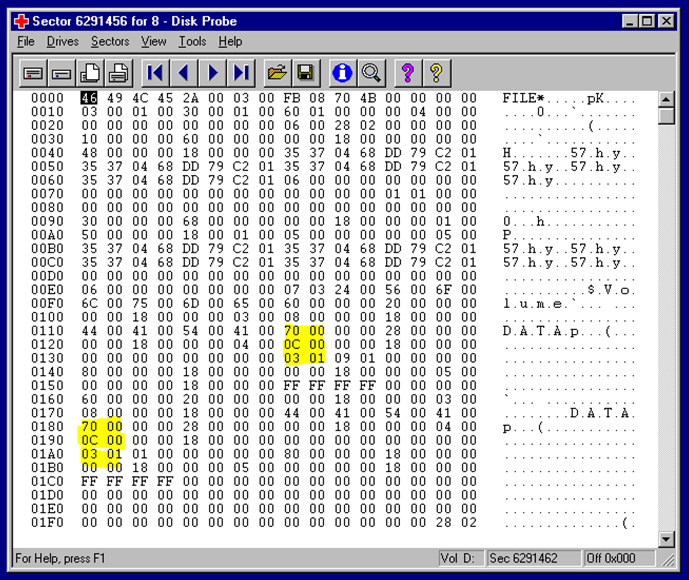 Typical DSKPROBE.EXE screenshot
17. At the lines starting with 0130 and 0180 (may differ on your system) there is "03 01"
18. Change BOTH instances of “03 01” to “01 02”
19. X out of DSKPROBE
20. Click Yes to Flush Current Changes to disk?
21. Click Yes to The current handle is in Read Only mode…
22. Click Write it on Write Sector
23. Click Yes to Are you sure…
24. Open a command interpreter and run CHKDSK X: to see if the modification worked.
25. If successful you will see:
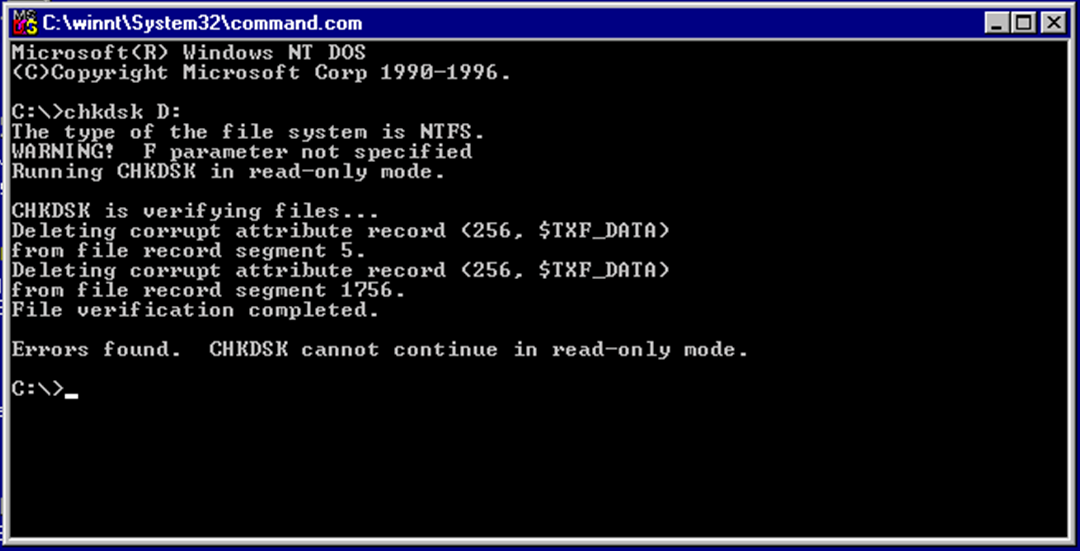
26. Run CHKDSK X: /R to set it up to fix the disk at next reboot.
27. Close winVNC, and reboot the BCM
28. Connect a monitor to the BCM video output, to monitor CHKDSK progressing the repairs on the blue bootup screen.
29. Once this process is complete, the driver load progress bar will appear at the bottom of the screen “…………………”

© 1987-2024 Verulam Telephone Company